Blog

  • Twitter: A greasemonkey script to show who follows you

    A couple of days ago I saw @skap5’s comment:

    “Dear Twitter Is it too much to ask to add a follower marker so I can know if someone is following me and not just if I am following them?”

    I think that Twitter could benefit from displaying more information on the home page, and this idea was easy enough to code up. It should save some time and make the Twitter homepage that much more useful.

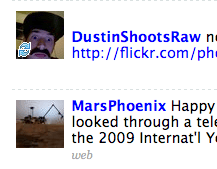
    twitter_showfollowers_screenshotThe script displays a tiny icon on top of the portrait of people who are following you back on your Twitter home page. It leaves your non-followers alone, though it would be easy enough to develop a version that puts silly mustaches on them.
    This is only a first version, and I welcome your comments and suggestions.

    If you already have Greasemonkey installed, get the script here, or install it from here as a Firefox extension thanks to the script compiler.

    The icon is a free icon courtesy of famfamfam.

  • Welcome

    Welcome

    Hello, and welcome to everyone who found this site via Torley’s story on the Second Life blog!

    I lead the Immersive Media Lab at J&W University. Several of our projects have utilized Second Life, including Virtual Morocco (cultural exchange and tourism promotion for the country of Morocco) and SLMetrics (a study of behavior modeling in virtual environments).

    This isn’t a Second Life blog, but you will find LSL scripts and other related ephemera around.

    You can subscribe to the RSS feed for this site, or find out more about me at HilaryMason.com.


  • The Essential Elements of Geek Culture (March, 2008)

    Office Space Movie Poster

    I was talking to my web programming seminar about regular expressions and made an allusion to the xkcd comic on that topic. Unfortunately, none of them had seen it, probably because none of them were familiar with xkcd.

    Students should become familiar with the concepts and practice of the discipline, but also with the culture and in-jokes that will help them fit in when they get into industry or graduate school. I also like to get people to laugh in ways that are relevant to the subject material (yes, I use a lot of cheesy geek jokes — ask me to tell you my LISP joke sometime).

    I asked the Twitter community what other geek cultural elements I should introduce the students to, and here are the answers:

    This list is thanks to (in order of appearance) @mediacrisis, @rubaiyat, @techpickles, @mattgillooly, @hempstyle, and @inkedmn.


    <!–

    –>

  • How to Control Second Life with a Wii-mote (on a Macbook Pro)

    wii + SL = cool

    My research group had some fun controlling SL with a Wii-mote a few weeks ago. It’s easier than you think! Several people have asked how we did it, so I hope these quick instructions might come in handy.

    1. Download, install, and run DarwiinRemote.
    2. Turn Bluetooth on on the Macbook. You can do this by opening the Bluetooth Preferences Pane (Apple menu, System Preferences and choose “Bluetooth” under Hardware) and clicking the big “Turn Bluetooth On” button. If Bluetooth is already on, you can skip this step!
    3. Hold the Wii-mote in front of the Macbook and press buttons 1 and 2 simultaneously. The LEDs on the Wii-mote will flash.
    4. As you move the Wii-mote, you’ll see your movement plotted on the screen, as you see below.
    5. Drop down the option box and choose “Mouse Mode On (Motion)”.
    6. Load up Second Life.
    7. Fly! By default, you can control the direction with the direction keys at the end of the Wii-mote.
    8. Laugh with glee, because this is cool.

    darwiinmote


    <!–

    –>

  • What’s wrong with this hat?

    hat

    The vendor containing this hat was recently deleted from Virtual Morocco by an employee of Linden Lab without any notification to me. Why? Because an anonymous person complained that it is “broadly offensive”.

    Virtual Morocco was created to be both a tourism promotion platform and a space for cultural exchange. It was built entirely by undergraduate students as an educational service-learning project.

    We give space in the Marrakesh Marketplace to several Moroccan artisans with virtual goods for sale. Our only requirements are that they keep everything appropriate to the sim’s theme and to the educational context of the space. The vendor selling the hat was owned by a college student (not from our institution) who specializes in items appropriate for the Morocco of the 1940s.

    This hat does appear to be in the Nazi style. Even if it is, it is historically and thematically appropriate for Virtual Morocco.

    Managing a space for cultural communication is not always an easy task. We have dealt with anti-Muslim intolerance, anti-American intolerance, and other forms of inappropriate behavior. When an incident occurs, I try to use it as a learning opportunity and prompt for discussion for my students and the members the our Virtual Moroccan community.

    This incident has implications far beyond one college student and an ambiguously offensive hat. How can we create an academic space – a space for the free exchange of ideas – if our content can be deleted arbitrarily, by a third party?

    I’m posting this now because my support request has gone unanswered for several weeks. I will post updates as the situation develops.


    <!–

    –>